Table tennis robots make it easier to build reliable practice time into your routine, whether you are refining serves, improving footwork, or repeating a difficult stroke without a partner.
This roundup compares 10 training machines across ball capacity, control options, drill variety, spin adjustment, oscillation, portability, and recycling features so you can choose a setup that matches your goals and space.
Best 10 Table Tennis Robots for Solo Training Picks for 2026
Most Customizable

- 264 preset drills with custom programming
- App and remote control
- Nine spin types and 150-ball capacity
Best For: Players and coaches seeking detailed, varied solo practice
Best Remote-Control Value

- Wireless remote adjustments
- Direct and indirect serve options
- One-year normal-wear replacement support
Best For: Players with a compatible thinner table
Simple Starter Pick

- Designed for solo practice
- Adjustable spin and speed
- Includes 100 balls
Best For: Adult beginners wanting basic independent drills
Lightweight Classic
iPong Original Table Tennis Trainer

- 2.5-pound design
- 110-ball capacity
- 12–70 balls per minute with topspin and underspin
Best For: Players practicing basic repetition with a portable robot
Smart Drill Pick
Dora Smart Pro Table Tennis Robot
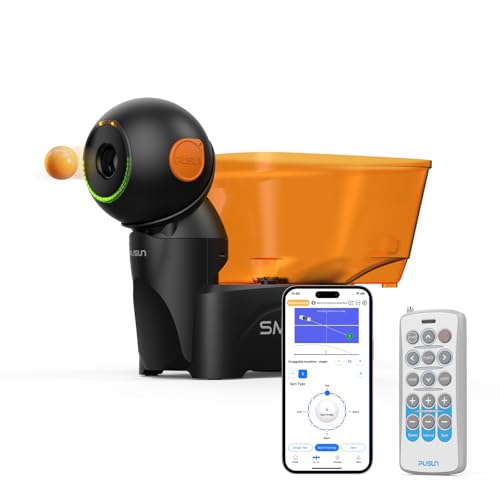
- 200+ preset training drills
- Triple-motor spin, speed, and placement control
- Remote and app customization
Best For: Structured solo practice with extensive drill options
Ball-Recycling Workhorse

- Recycling net and 200 balls included
- Adjustable spin, speed, and oscillation
- Robot head supports direct or indirect serves
Best For: Long solo sessions with less ball pickup
Simple Speed Trainer

- Wireless remote control
- 30–70 balls per minute
- Adjustable spin, speed, and direction
Best For: Quick, uncomplicated practice for beginners and families
Complete Recycling Pick
WAYMARK JT-A Solo Training Robot

- Recycling net holds up to 200 balls
- 8.9–76 mph speed range with multiple spins
- Ambidextrous control panel and 100 balls included
Best For: Efficient solo practice with automatic ball collection
Connected Drill Specialist

- 5–120 balls per minute frequency control
- App-based drill sequencing via Android tablet
- Includes 120 balls, carry bag, and 3-year warranty
Best For: Structured practice with programmable connected drills
Programmable Trajectory Leader

- 576 pre-saved trajectories
- Remote and app control with automatic oscillation
- Adjusts speed, rotation, landing, height, and frequency
Best For: Highly varied practice with detailed trajectory control
Most Customizable – PONGBOT NOVA S Pro
For players comparing table tennis robots for solo training, the PONGBOT NOVA S Pro stands out for its extensive drill library and detailed controls. Its app and remote let you adjust speed, spin, frequency, height, and landing points, while 264 preset drills and custom programming support structured practice.
Best For: Beginners through advanced players, coaches, and anyone who wants highly customizable solo sessions.
Pros:
- Includes 264 preset drills plus customizable training routines.
- App and remote control offer detailed speed, spin, frequency, and placement adjustments.
- Supports nine spin types, 150-ball capacity, and near-net serve trajectories.
- Offers count, combo, and double-bounce serving modes.
Cons:
- 40mm-or-larger balls and two AAA batteries are not included.
- Its broad feature set may take time to learn.
The NOVA S Pro is a strong choice when variety and precise placement matter more than a basic, plug-and-play setup. A one-year warranty adds useful ownership support.
Best Remote-Control Value – Suz S102 Table Tennis Robot
The Suz S102 is a practical option among table tennis robots for solo training, providing wireless remote adjustments for spin, speed, frequency, and oscillation. Its adjustable robot head can support direct or indirect serves, giving players a way to vary basic practice sessions without a partner.
Best For: Players who want adjustable solo drills through a wireless remote and already have a compatible table.
Pros:
- Wireless remote allows adjustments to spin, speed, and frequency.
- Adjustable head supports direct- and indirect-serve practice.
- Manufacturer offers replacement parts for normal wear and tear within one year.
Cons:
- Only fits table tennis tables less than 2.5 inches thick.
- Proper serving requires at least 20 balls in the storage tube.
- Oscillation may require manual assistance if it does not start working.
The S102 can cover essential solo practice needs, but its table-thickness restriction and setup guidance make compatibility worth confirming before purchase.
Simple Starter Pick – Suz S101 Ping Pong Machine
The Suz S101 is a straightforward choice for shoppers seeking table tennis robots for solo training without a long feature list. It is designed to provide practice without a partner and lets users adjust spin and speed to work on repeatable drills.
Best For: Adult beginners who want a basic machine for independent practice.
Pros:
- Designed for solo training when a practice partner is unavailable.
- Adjustable spin and speed support different drills.
- Includes a 100-ball setup for repeated practice.
Cons:
- The supplied notes provide limited information about control methods and serving modes.
- Its plastic construction may be less appealing to shoppers seeking a more advanced machine.
The S101 focuses on the essentials: repeated ball delivery and adjustable practice. It is worth considering for beginners who prioritize a simple training aid over extensive programming.
Lightweight Classic – iPong Original Table Tennis Trainer
The iPong Original is a compact, lightweight option for table tennis robots for solo training. It holds up to 110 balls, offers adjustable topspin and underspin, and delivers balls at 12 to 70 per minute, making it suitable for repeatable fundamentals practice.
Best For: Players who want a lightweight robot with simple spin and frequency adjustments.
Pros:
- Weighs 2.5 pounds for easier handling.
- Holds up to 110 balls and serves at 12 to 70 balls per minute.
- Provides adjustable topspin and underspin.
- Includes a remote, AC adapter, and instruction manual.
Cons:
- Its listed spin selection is limited to topspin and underspin.
- It does not list the broader drill programming found on more advanced robots.
The iPong Original keeps setup and operation relatively simple, with assembly taking under a minute. It is a sensible fit for players focused on basic repetition and portability.
Smart Drill Pick – Dora Smart Pro Table Tennis Robot
For players comparing table tennis robots for solo training, the Dora Smart Pro emphasizes drill variety and precise ball placement. Its app and remote controls, triple-motor system, and more than 200 preset drills make it suited to structured practice.
Best For: Players who want extensive preset drills and adjustable spin, speed, frequency, and placement.
Pros:
- Includes more than 200 pre-saved training drills.
- Triple-motor launching system supports adjustments to spin, speed, and landing location.
- Offers remote and app control, plus customizable personal drills.
- Designed for broad table coverage and includes a remote, power adapter, and user manual.
Cons:
- The supplied specifications list conflicting warranty durations, so verify coverage before purchase.
- Its listed dimensions are relatively large for a desktop robot.
The Dora Smart Pro stands out when your priority is guided, repeatable practice rather than a basic serve-only machine. Its combination of preset routines and manual control gives solo players room to progress from ready-made drills to customized sessions.
Ball-Recycling Workhorse – Suz S201 Table Tennis Robot
The Suz S201 is a practical option among table tennis robots for solo training because its recycling net returns balls to the machine, reducing interruptions between rallies. It also provides controls for spin, speed, oscillation, and robot-head angle.
Best For: Players who want extended practice with automatic ball collection and hands-on serve adjustments.
Pros:
- Includes a machine recycling net and 200 balls, so you spend less time collecting balls.
- Offers multiple spin, speed, and oscillation settings.
- Adjustable robot head supports direct or indirect serves.
- Designed for one-player use and described as easy to assemble.
Cons:
- Requires at least 20 balls around the feeding tube for proper serving.
- Only fits table tennis tables up to 2.5 inches thick.
- The supplied notes recommend consulting the manual for installation and adjustments.
Choose the S201 if ball retrieval is your main annoyance during solo sessions. Its recycling setup is the key convenience, while the spin, speed, oscillation, and angle controls provide enough flexibility for varied practice.
Simple Speed Trainer – iPong V300 Table Tennis Robot
For shoppers seeking straightforward table tennis robots for solo training, the iPong V300 focuses on quick setup and wireless control. It adjusts ball frequency, speed, direction, and spin, with output ranging from 30 to 70 balls per minute.
Best For: Beginners, families, and players who want uncomplicated practice with adjustable delivery speed.
Pros:
- Wireless remote lets you change practice settings from across the table.
- Adjusts ball frequency, speed, direction, topspin, and backspin.
- Feeds up to 70 balls per minute, with a slower 30-ball-per-minute setting.
- Assembles quickly without an app or complicated instructions.
Cons:
- The supplied notes do not list a ball-recycling net or included ball supply.
- It has fewer documented preset-drill features than the Dora Smart Pro.
- The package details list only the main product among included components.
The iPong V300 is a sensible pick when ease of use matters more than advanced programming. Its remote, adjustable delivery, and fast setup make it convenient for frequent fundamentals practice without app-based configuration.
Complete Recycling Pick – WAYMARK JT-A Solo Training Robot
For players comparing table tennis robots for solo training, the WAYMARK JT-A is built around efficient, repeatable practice. Its recycling net holds up to 200 balls, while adjustable serving speed, spin, angles, and landing points let you create sessions for different skill levels.
Best For: Players who want an all-in-one robot with automatic ball collection and broad drill customization.
Pros:
- Automatic recycling net holds up to 200 balls and includes 100 balls.
- Adjustable 8.9–76 mph speed range supports beginner and advanced practice.
- Offers topspin, backspin, no-spin, side-spin, and mixed-spin options.
- Detachable control panel can be positioned for left- or right-handed use.
Cons:
- Designed for tables up to 2.5 inches thick.
- The supplied specifications list a plastic construction and a 7.5 kg weight, which may be less convenient for frequent repositioning.
The JT-A stands out when minimizing ball pickup is a priority. Its wide speed and spin adjustments make it a flexible choice for solo drills, while the included net and balls reduce the need to assemble a separate training setup.
Connected Drill Specialist – Butterfly Amicus Prime Robot
The Butterfly Amicus Prime is a premium option among table tennis robots for solo training, with wireless app control and programmable practice sequences. Its adjustable frequency and drill automation are suited to players who want structured footwork and stroke sessions rather than basic ball launching.
Best For: Dedicated players who value app-based control, saved drills, and repeatable training routines.
Pros:
- Adjusts ball frequency from 5 to 120 balls per minute.
- Can sequence multiple drills automatically or run them randomly.
- Bluetooth app control uses the supplied Android tablet.
- Includes a recycling catch net, 120 balls, carry bag, and a 3-year warranty.
Cons:
- At 20 pounds, it may be less portable than lighter training robots.
- Its feature-rich app and drill system may be more than casual players need.
Choose the Amicus Prime if training structure is as important as ball delivery. The ability to save, sequence, and update drills gives it a strong advantage for players developing consistent routines over time.
Programmable Trajectory Leader – PONGBOT Table Tennis Robot
The PONGBOT is aimed at players seeking extensive drill variety from table tennis robots for solo training. Remote or app control, automatic oscillation, and 576 pre-saved trajectories provide a broad starting library, while programmable settings cover frequency, speed, rotation, landing, and height.
Best For: Players who want a large selection of preset trajectories and detailed control over ball placement.
Pros:
- Includes 576 pre-saved trajectories for varied practice.
- Remote and app control provide flexible operation.
- Automatic oscillation helps vary ball direction.
- Programmable frequency, ball speed, rotation, landing point, and height.
Cons:
- The supplied notes do not specify the ball capacity or included ball count.
- At 14 kg, it is relatively substantial for a training device that may need repositioning.
The PONGBOT is compelling for players who do not want to repeat a small set of basic feeds. Its large trajectory library and adjustable delivery parameters support varied sessions, though buyers may want to confirm included accessories and recycling details before ordering.
How We Picked the Best Table Tennis Robots for Solo Training
We focused on the features that most directly affect practice quality and convenience: ball capacity, automatic recycling, spin and speed adjustment, oscillation range, drill programming, remote or app control, setup requirements, and portability. We also considered whether each robot is better suited to beginners, technical repetition, structured coaching, or advanced multi-ball workouts.
A higher ball count can reduce interruptions, but it does not automatically make a machine better. Control precision, consistent placement, and the ability to vary pace and spin often matter more than maximum capacity. Machines with nets or recycling systems are especially useful for frequent solo sessions because they limit the time spent collecting balls.
Quick Comparison
| Best for | Prioritize | Helpful features |
|---|---|---|
| Beginners | Simple controls and adjustable speed | Remote control, compact setup |
| Skill repetition | Consistent placement and spin control | Programmable drills, oscillation |
| Long practice sessions | Large capacity and ball recycling | Integrated net, 150–200+ ball capacity |
| Advanced training | Precise trajectories and varied sequences | App control, multi-motor systems |
| Small spaces | Portability and easy storage | Desktop design, quick assembly |
Key Buying Factors for Table Tennis Robots for Solo Training
Ball Capacity and Recycling
Choose a larger hopper or recycling net if you want uninterrupted drills. Smaller capacities can be perfectly adequate for short sessions, serve practice, or users who prioritize easy storage.
Spin, Speed, and Placement Control
Look for independent adjustment of speed, frequency, and topspin or backspin. Oscillation is important for practicing movement across the table, while fixed placement works well for isolating one stroke.
Controls and Drill Programming
Remote controls are convenient for quick changes during practice. App-based systems may offer more saved drills and detailed customization, but they can require more setup and a compatible phone.
Setup, Compatibility, and Storage
Confirm that the robot fits your table, uses standard 40 mm balls, and has enough clearance for its feed angle and oscillation. Portable or desktop models are easier to store, while net-equipped designs need more room but usually simplify ball collection.
Who Should Buy Which Table Tennis Robots for Solo Training?
New players and occasional users should favor a straightforward, adjustable machine that is quick to assemble and does not overwhelm them with programming options. Players focused on consistent stroke mechanics should choose a robot with dependable placement, controllable spin, and repeatable feeds. Those working on footwork or match patterns will benefit from oscillation and programmable sequences.
For intensive training, prioritize a large hopper, automatic recycling, broad speed and spin ranges, and app or remote controls that make it easy to change drills. If storage is the main concern, a compact desktop model may be the better compromise, even if it offers fewer advanced features. Before buying, match the robot’s capacity and control system to how often you practice—not simply to the highest specification on the product page.